For Apple Silicon Macs · alpha

They speak Hebrew.
You read it your way.

Hebrew Live listens to your microphone, shows spoken Hebrew as text and puts a translation into one of 45 languages right beside it. Recognition and translation run on your Mac, not in the cloud.

v0.1.0-alpha.3 · 353 MB DMG · macOS 27+

Hebrew Live Recording
עברית English on this Mac
    Demo: phrases and translations are scripted; the app looks different.
    45translation languages, from English and Russian to Japanese
    Offlineonce the models are prepared, recognition and translation need no network
    No accountdownload, install, press Start recording
    How it works

    The whole path from sound to translation stays inside your Mac.

    1. Microphone

      Opens only after you press Start recording.

    2. Silero VAD

      Finds speech in the audio and drops the pauses.

    3. Whisper Turbo

      An ivrit.ai model trained on Hebrew turns speech into text.

    4. MiLMMT

      Translates every phrase into the language you picked.

    You need the internet once, to download the models — about 3.83 GB. Conversations stay in a local archive, and recognition and translation have no cloud fallback.

    Interface

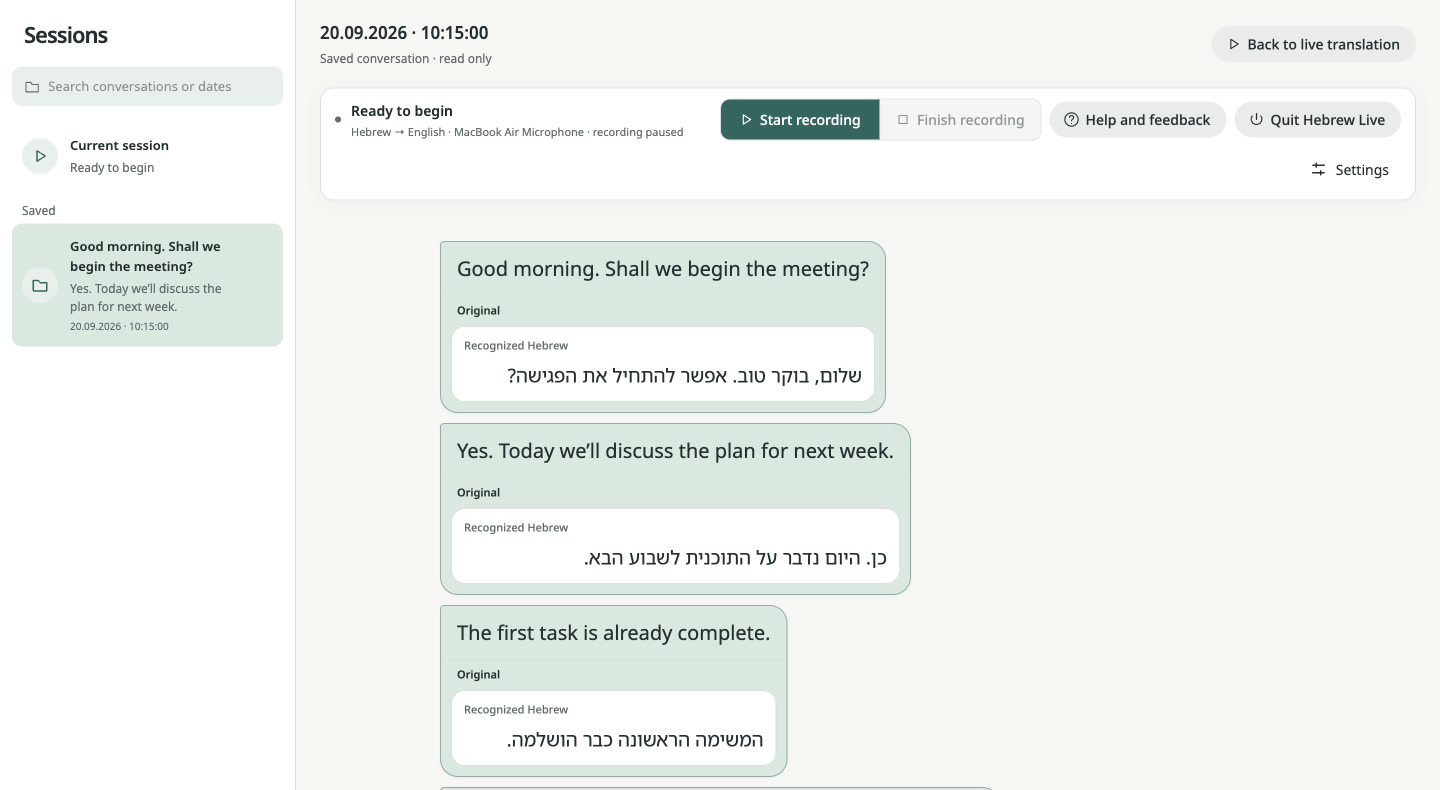
    Original and translation in one card.

    Hebrew Live
    Saved session: Hebrew phrases with their English translation
    A saved conversation: the translation in large type, recognised Hebrew below it. English interface, demo text.

    Install

    Four steps to your first conversation.

    Download DMG

    Release notes and SHA256SUMS

    You will need

    • A Mac with Apple Silicon (M1 or later)
    • macOS 27 or later
    • ~900 MB for the app and 3.83 GB for the models
    • No Python or Homebrew to install
    1. Download and verify

      Compare the DMG checksum with the SHA256SUMS file from the release:

      shasum -a 256 ~/Downloads/Hebrew-Live-0.1.0-alpha.3-arm64.dmg
    2. Move it to Applications

      Open the DMG and drag Hebrew Live into the Applications folder.

    3. Allow the first launch

      The alpha is not notarised by Apple, so macOS blocks it. If the checksum matched, run this in Terminal:

      xattr -dr com.apple.quarantine "/Applications/Hebrew Live.app"

      Without Terminal: click Done in the macOS prompt, then System Settings → Privacy & Security → Open Anyway.

    4. Prepare the models and listen

      On first launch the app downloads its models. Then pick a microphone and a translation language and press Start recording.

    Straight talk about the alpha

    • Tested on one M5 Mac with 16 GB of memory. The minimum memory is not established.
    • Installing on another Mac, the microphone permission prompt and recording with this exact build have not been tested yet.
    • The app listens to the microphone. It does not capture system audio, such as a call in your headphones.
    • The code is open under Apache-2.0. The models come with their authors’ terms.
    Found a bug? Open an issue →